Mastering Tricky Keys
Typing might seem straightforward, but certain keys can pose unique challenges, especially when you're aiming for speed and accuracy. Our "Tricky Keys" section is designed to help you conquer those problematic characters and combinations that often trip up even experienced typists.
What Are Tricky Keys?
Tricky keys are those characters or key combinations that are less intuitive or require more precise finger movements. This might include:
- Special Characters: Symbols like @, &, and %, which are not as frequently used and can disrupt your rhythm.
- Number Row Characters: Keys like 1, 2, and 3 when combined with symbols (e.g., !, @, #) can be confusing.
- Modifier Keys: Shift, Ctrl, and Alt combinations can be tricky to master, especially in combination with other keys.
- Complex Key Combinations: Keys used in shortcuts or programming languages, such as {} or ().
Examples of Tricky Keys
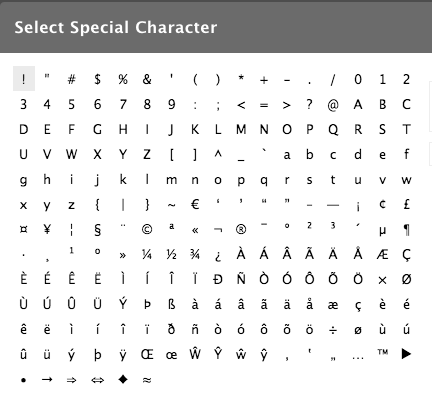
Special Characters

Number Row Characters
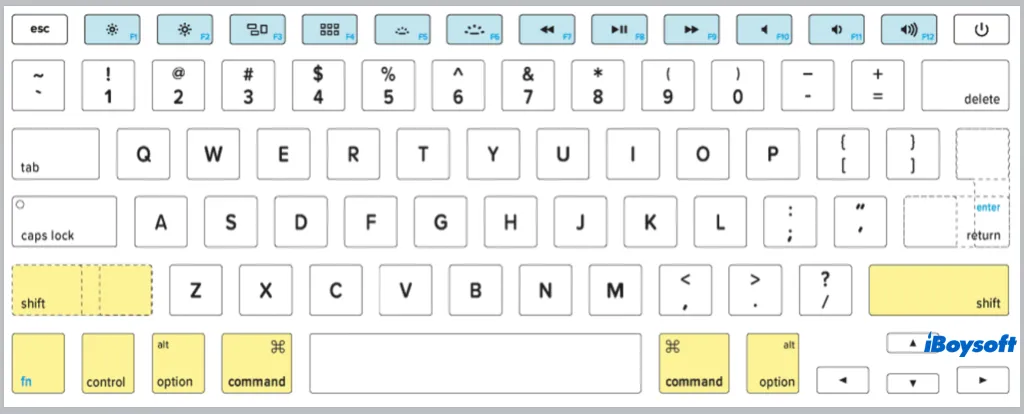
Modifier Keys

Complex Key Combinations
Why Focus on Tricky Keys?
Mastering these keys is crucial for improving your overall typing efficiency. Tricky keys often require:
- Precision: You need to strike the right key without disrupting your typing flow.
- Coordination: Combining multiple keys or using modifier keys can be challenging.
- Practice: The more you practice, the more intuitive these tricky keys become.
How We Can Help
In our Typing Tutor, you'll find specialized exercises and drills tailored to these tricky keys. Our interactive lessons and practice sessions are designed to:
- Increase Familiarity: Get comfortable with the feel of each key and key combination.
- Enhance Speed: Improve your reaction time and accuracy.
- Build Confidence: Feel more confident handling these keys in real typing scenarios.
Tips for Mastery
- Practice Regularly: Consistent practice is key to overcoming difficulty with tricky keys.
- Use Proper Technique: Ensure you're using the correct finger placement and hand positioning.
- Stay Patient: Mastery takes time. Don't get discouraged by initial challenges.
What Our Users Say
"The Tricky Keys exercises helped me improve my typing speed and accuracy. I never realized how much these keys were holding me back!"
- Yugal Bansal
"A great resource for anyone looking to polish their typing skills. The lessons are engaging and very helpful."
- Divyanshu